Holiday rental management software

Run every stay from one workspace.

See who’s arriving, what’s still owed and which properties need a clean. Purview PMS brings bookings, guest messages, changeovers and owner statements together for letting agencies and independent owners.

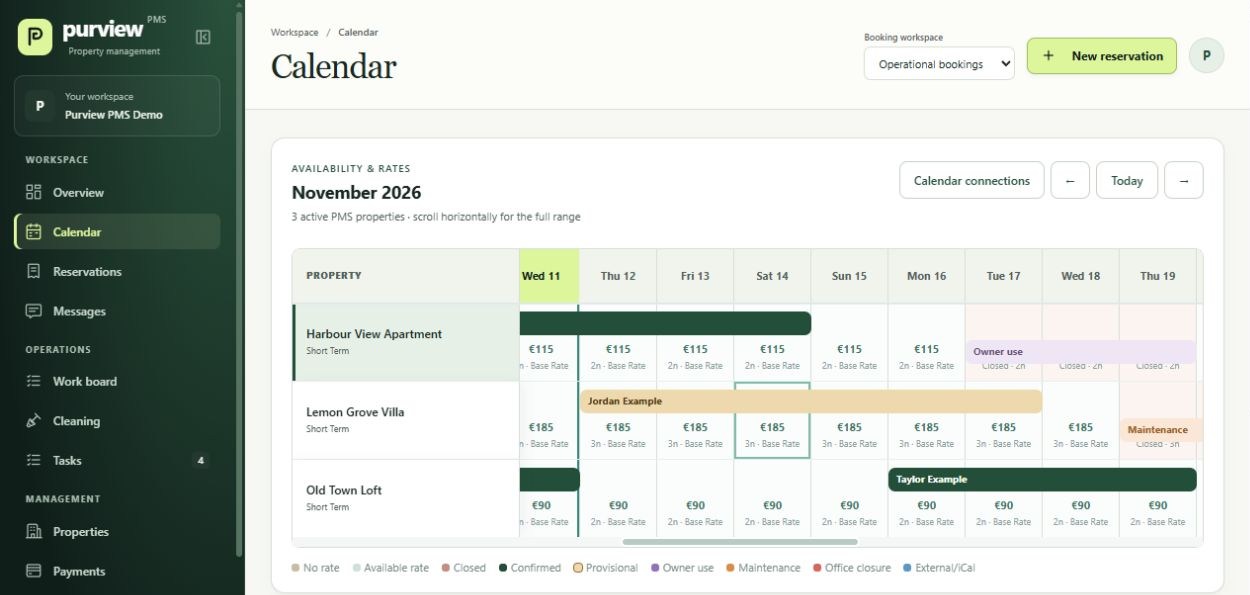
Three demo properties in the Purview calendar, with nightly rates, confirmed bookings, a provisional booking and an owner-use block
Reservation calendarPurview PMS demo workspace

A clearer view of your day

Know what needs doing before the next guest arrives.

See availability at a glance
Check bookings, nightly rates and blocked dates across your properties.
Catch the follow-ups
Spot an unpaid balance, an unsigned agreement or a clean that still needs assigning.
Keep owners informed
Report on bookings and revenue, account for deductions and record owner payments.

Product tour

From reservation to owner statement

Follow the work your team does on a real stay. Every screen below comes from the separate Purview demo workspace and uses fictional records.

Reservations & guest communication

Open a booking and see what’s next.

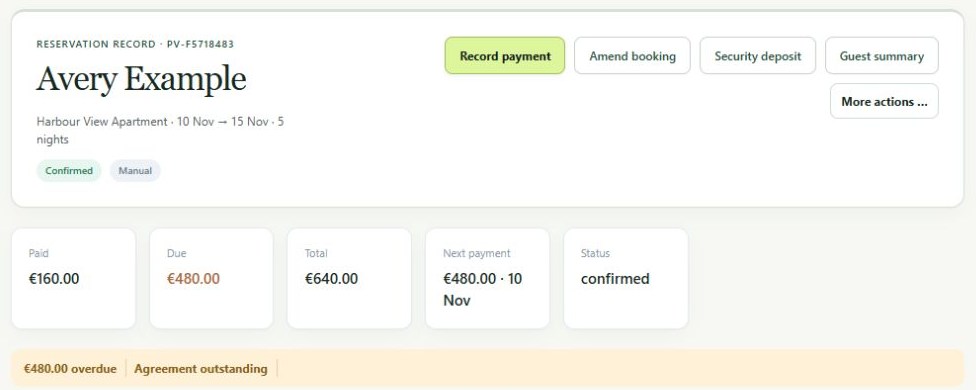
See the stay dates, guest details, booking total and next payment together. The reservation highlights overdue balances and outstanding agreements, so your team can see what needs attention before arrival.

  • Set property rates and override individual dates when plans change.
  • Record manual payments against instalments and track security deposits separately.
  • Draft guest emails in English or Spanish, share the guest portal and request agreement acceptance.
A fictional Harbour View Apartment booking with the paid amount, balance due, next payment date and an outstanding guest agreement
Reservation details

Work board & cleaning

Get every property ready for the next arrival.

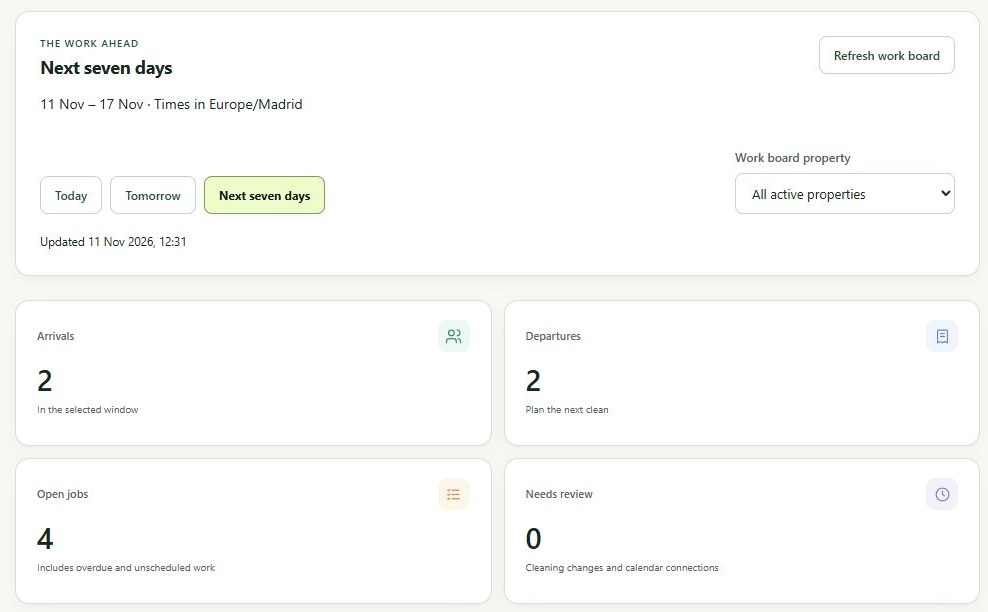
Use the work board to see arrivals, departures and open jobs across your portfolio. Review today, tomorrow or the next seven days, then assign the work that needs doing.

  • Give cleaners a personal link with stay dates, guest counts and their checklist.
  • Keep guest identities and payment information out of the cleaner view.
  • Email job details automatically when assignments or timings change, if enabled.
The demo work board showing upcoming arrivals, departures and open jobs for the next seven days
Work board

Reports & owner settlements

Answer owner questions with the figures in front of you.

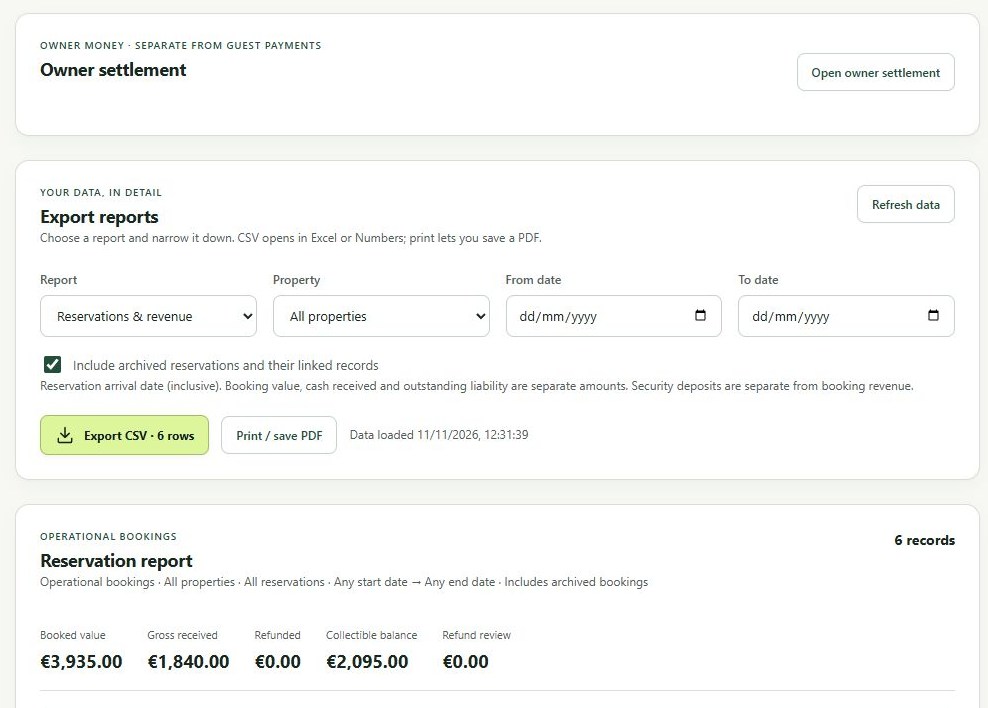
See what was booked, what you received and what’s still due. Filter reports by property and date, then export the figures for your records.

  • Export booking, payment and cleaning reports as CSV or save a PDF.
  • Prepare owner statements with deductions and credits.
  • Record the amount and date once you’ve paid the owner.
Report filters, CSV and PDF export options, and booked, received and outstanding totals for the demo portfolio
Reservations and revenue report

Direct enquiries & booking requests

Take booking requests on the website you already have.

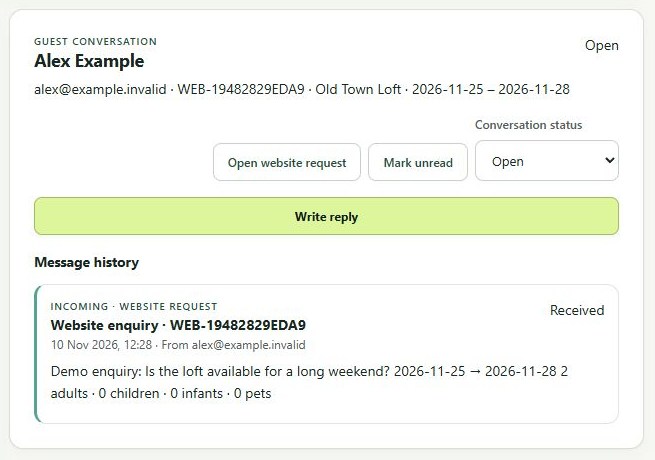
Give guests a way to contact you from your own property pages. Your team can review each request in the PMS, with the dates, party size and property already attached.

  1. Add the widget. Paste the embed code into your site.
  2. Receive the request. Guests choose their dates and share who’s staying.
  3. Review and reply. Open the request in Messages and decide how to proceed.
See the website workflow in a demo
A fictional guest’s website enquiry displayed in the Purview Messages inbox, with requested dates, guest count and the original message
A website enquiry in Messages

Before you switch

Common questions

What to know before trying Purview PMS with your properties and team.

Who is Purview PMS for?

It’s built for holiday letting agencies managing properties for multiple owners, and for independent owners who want to manage bookings, guest communications and changeovers themselves.

Can I keep using my current calendar while I try it?

Yes. Purview PMS can import occupied dates from Lodgify or another service that provides an iCal feed. It imports availability blocks, so you can keep your existing channel setup during the trial.

Do I need a new website?

You can add a booking request or enquiry widget to your existing website wherever it accepts HTML embeds. Your team reviews the request in the PMS before confirming the stay.

Can cleaners use it without a full PMS login?

Yes. Each cleaner can use their own access link for assigned jobs and checklists. Their view includes the property and stay timings without exposing guest names or payment details.

What happens when I request a demo?

Tell us how many properties you manage and what you want to see. We can walk through a booking together and invite you to a separate workspace with sample properties and reservations.
Guided demo

See how Purview would work for your rentals.

Tell us a little about your portfolio. We’ll show you the parts of the PMS that matter most to your team.